
How to Deposit & Cash Out on 5Z777 in 2026
For online betting, players need to deposit and withdraw money. If you don’t know how to make these two transactions correctly, your betting experience may be disrupted. So it’s important to learn the right way to do it from the start. 5Z777 understands players’ needs and has made it very easy to deposit and withdraw money. Even new players can complete transactions in just a few steps. With Bkash, Nagad, and Rocket, you can deposit and withdraw money quickly and securely.
5Z777 Deposit Guide
Step 1: Log In and Go to the Deposit Section
Log in to your account. Click the “Deposit” button on the homepage.
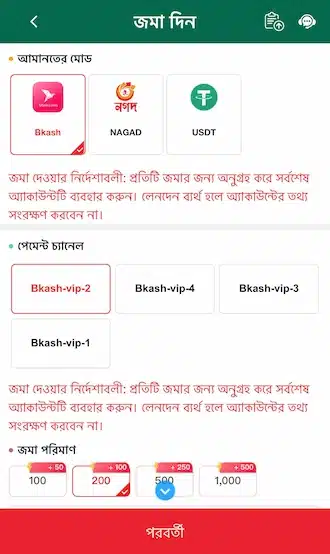
Step 2: Select a Payment Method
The deposit page will open. Select your preferred payment method and channel.
Step 3: Enter the Amount and Submit
Enter the deposit amount within the specified limit (100–50,000 Taka). Click the “Submit” button.
Step 4: Transfer the Payment
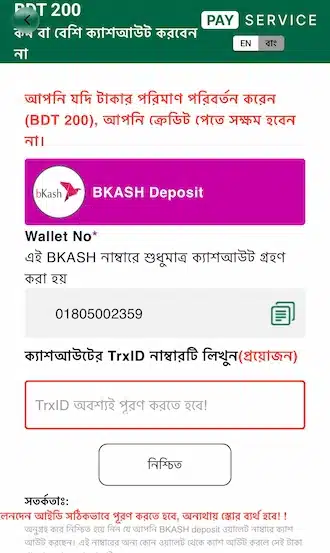
It will direct you to the deposit info page. Transfer the exact amount based on order info. If you transfer the right amount, your balance will be updated automatically.
Step 5: Confirm the TrxID
After payment is completed, return to the deposit page. Enter the TrxID code correctly. Your balance will be updated within 1–2 minutes.
5Z777 Withdrawal Guide
Step 1: Go to the Withdrawal Option
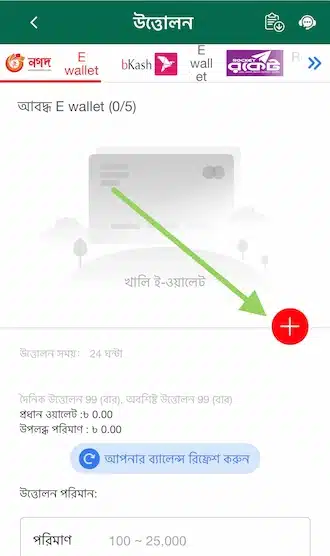
After you reach the betting turnover, go to the account management section. Then, select “Withdrawal”.
Step 2: Select a Payment Method
Select your preferred method (nagad, bkash or rocket). Tap (+) icon to add account details.
Step 3: Enter the Account Holder’s Name
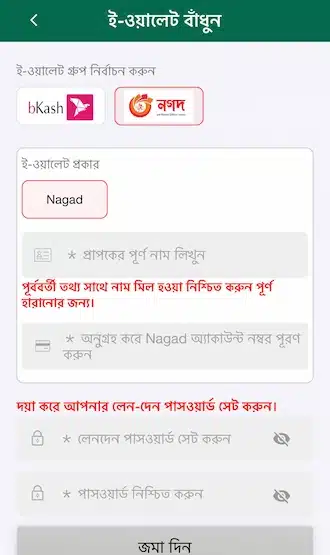
Enter the account holder’s name. The name must match the name provided during registration.
Step 4: Set a Withdrawal Password
When you make your first withdrawal, you will set a 6-digit withdrawal password. This is a security measure to prevent someone else from withdrawing your balance.
Step 5: Transfer the Balance to the Main Wallet
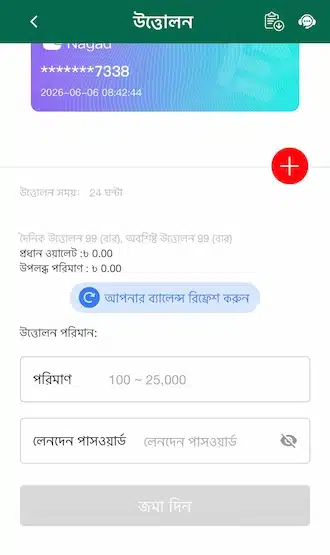
Go back to withdrawal page. Transfer all balance into main wallet before withdrawing.
Step 6: Enter the Amount and Submit
Enter the amount of money to be withdrawn (max: 100-50,000 Taka). Enter the password for withdrawal. Click on Submit. Wait until the money is credited to your account.
Important Notes Before Withdrawing at 5Z777
To withdraw quickly and smoothly, keep the following points in mind:

Check the Limit
Before withdrawal you should check your balance. You can withdraw minimum 100 Taka and maximum 50,000 Taka at a time.
Processing Time
It depends on the bank and e-wallet. Withdrawal to e-wallet is usually faster.
Provide Correct Information
Provide all personal information correctly during withdrawal. Incorrect information may cause a system error.
Stay Within the Limit
Don’t try to withdraw more than the limit. If you exceed the limit, the withdrawal will fail.
Follow Fair Play
Prohibited to engage in fraudulent activities. If you break the rules, the withdrawal will be refused and your account will be suspended.
Withdraw to Your Own Account
Please make sure to only withdraw to a bank account or e-wallet under your own name. Any third-party accounts are strictly not allowed.
Read the Terms and Conditions
Make sure you check the terms and conditions before you withdraw your winnings. Failure to meet the terms and conditions could cause your withdrawal to fail.